Run your station.
Own your sound.
Live DJ control, radio automation and station management—all in one powerful console available on the web or as a native Mac app.
Explore the consumer demo—no payment required.
One console. Total control.
Compare the Virtual Broadcast Console with other tools used by independent broadcasters.
| FEATURES | DJsandMCMediaTMVIRTUAL BROADCAST CONSOLE | radio.coBY LIVEWIRE | SAMBROADCASTER PRO | RADIOBOSSBROADCASTING SOFTWARE | MIXXXOPEN SOURCE DJ SOFTWARE | LIVE365BY AUDACY | AZURACASTOPEN SOURCE PLATFORM |
|---|---|---|---|---|---|---|---|
| Browser-Based Access | ✓ Full (Web + Mac App) | ✓ Full (Web) | — Windows only | — Windows only | — Desktop only | ✓ Full (Web Management) | ✓ Full (Web Admin) |
| Live Broadcasting | ✓ Yes | ✓ Yes | ✓ Yes | ✓ Yes | ✓ Yes | ✓ Yes | ✓ Yes |
| Radio Automation | ✓ Yes | ✓ Yes | ✓ Yes | ✓ Yes | Partial (Auto DJ) | ✓ Yes | Partial (Playlists Only) |
| Dual DJ Players / DJ Console | ✓ Built-in | Not listed | ✓ Yes | ✓ Yes | ✓ Yes (4 Decks) | Not listed | ✓ Yes |
| Cart / Instant Pads | ✓ 4 Banks / 48 Pads | Not listed | ✓ Yes | ✓ Yes | ✓ Yes (Samplers) | Not listed | Not listed |
| Voice Tracking | ✓ MP3 128k | ✓ Voice Studio | ✓ Yes | ✓ Yes | Not listed | ✓ Voice Studio | Not listed |
| Scheduling & Playlists | ✓ Advanced | ✓ Yes | ✓ Yes | ✓ Yes | Limited | ✓ Yes | ✓ Yes |
| Listener Requests | ✓ Built-in | ✓ Yes | ✓ Yes | ✓ Yes | Not listed | ✓ Yes | Partial (Web Player) |
| Stream Diagnostics | ✓ Advanced (Planned) | Basic | Not listed | Basic (Logs) | Not listed | Basic | ✓ Yes |
| AzuraCast Integration | ✓ Native (Designed For) | Not listed | ✓ Compatible | ✓ Compatible | ✓ Compatible (Icecast/SHOUTcast) | Managed (Built-in) | ✓ Native (It Is) |
| Best For | DJs, Broadcasters & Stations wanting one modern platform for everything. | Radio stations needing cloud hosting, tools & management. | Broadcasters who want powerful automation & live DJ control on Windows. | Affordable automation software for internet radio stations. | DJs who want a free, powerful mixing & performance tool. | Broadcasters who want a hosted streaming solution with global reach. | Stations & developers who want an open source streaming platform. |
| Pricing | $79.99/month — console access; hosting separate | See provider for current pricing | See provider for current pricing | See provider for current pricing | Open-source software; hosting costs vary | See provider for current pricing | Open-source software; hosting costs vary |
Swipe to compare every platform →
Everything your station needs.
Nothing it doesn’t.
Stop bouncing between separate tools. Broadcast live, manage your sound and keep your station organized from one focused workspace.
Open it in your browser.
Install it on your Mac.
Use the DJsandMCMedia™ Virtual Broadcast Console instantly on the web, or download the native Apple silicon Mac `.app` for a focused desktop broadcast workspace.
This exact Mac app release was submitted to VirusTotal.
Download the ZIPGet version 1.0.0 for an Apple silicon Mac.
Extract the `.app`Open the ZIP from your Downloads folder.
Move it to ApplicationsLaunch the native Mac app and sign in.
Already have AzuraCast?
You’re ready to connect.
Bring your existing station and use the console as your modern live broadcast and management layer.
One platform.
One clear price.
No feature maze. No stripped-down starter version. Get the full Virtual Broadcast Console for one monthly price.
Virtual Broadcast Console
Full console access. Bring your own AzuraCast station or add managed radio hosting through DJsandMCMedia™.
- ✓ Full browser-based broadcast console
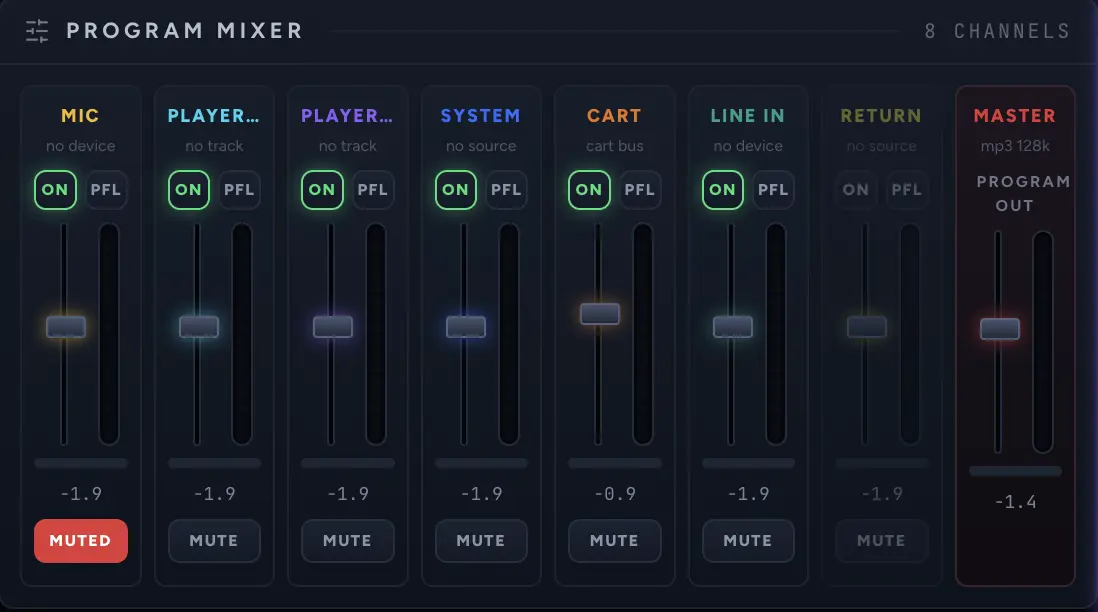
- ✓ Dual players, mixer and audio processing
- ✓ 4 cart banks with 48 instant pads
- ✓ Voice tracking, scheduling and playlists
- ✓ Listener requests and station tools
- ✓ Native AzuraCast connection
AzuraCast hosting is separate from the $79.99 console subscription.
Use your own station or request a managed hosting package.
Questions before
you go live?
Here are the basics. If you need help choosing a station setup, DJsandMCMedia™ can walk you through it.
Talk to us →Do I need AzuraCast?+
Yes. The console connects to an AzuraCast station. Use your own existing setup, or ask DJsandMCMedia™ about a hosted station package.
Do I need to install software?+
No installation is required to use the web console. Mac users can optionally download the Apple silicon app for a dedicated desktop experience.
Is the console really $79.99 per month?+
Yes. One clear monthly price gives you access to the complete Virtual Broadcast Console—no confusing feature tiers.
Can I cancel?+
Yes. This landing-page concept is designed around simple month-to-month access. Final billing terms can be added before checkout goes live.
Ready to take the board?
Bring your independent station into one modern broadcast workspace.
See the consumer experience before you subscribe—no payment required.